



Print this Topic
This section graphically explains the process for the creation of the financial 'Transaction Files' (*.csv) used for importing into Accounting Systems thus creating an interface with Aerotrac.
Stock/Stock Repairs
Example : PO Raised at £100, Supplier Invoice received for £150, £30 Tax
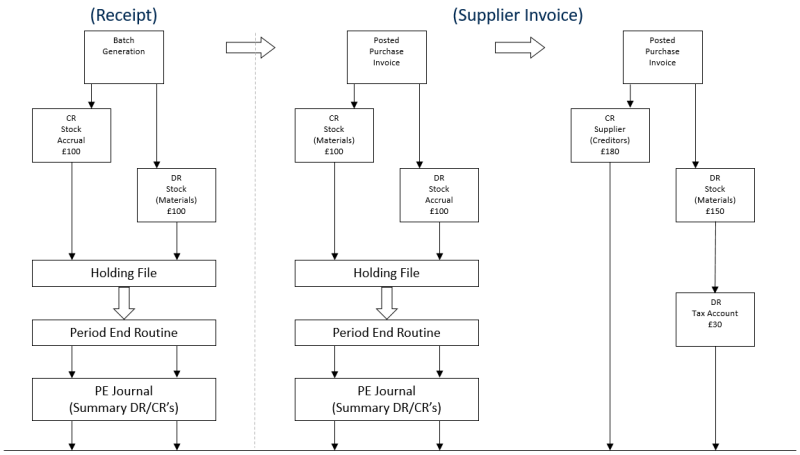
Transaction File (Link to Accounts Package)
Note : If a part is moved to WiP / CoS prior to the Purchase Invoice the accrual will move with the part, and will be reversed out in full once the Supplier Invoice has been matched and posted.
Labour

Transaction File (Link to Accounts Package)
Sub-Contract - Repair Orders
(Linked to Orders / Projects)
Example: RO Raised at £100, Supplier Invoice received for £150, £30 Tax

Transaction File (Link to Accounts Package)
Note : If a part is moved to WiP / CoS prior to the Purchase Invoice the accrual will move with the part, and will be reversed out in full once the Supplier Invoice has been matched and posted.
Miscellaneous Orders
(Linked to Orders / Projects)
Example: RO Raised at £100, Supplier Invoice received for £150, £30 Tax

Transaction File (Link to Accounts Package)
Note : If a part is moved to WiP / CoS prior to the Purchase Invoice the accrual will move with the part, and will be reversed out in full once the Supplier Invoice has been matched and posted.
Customer Invoices
(Project/Order)
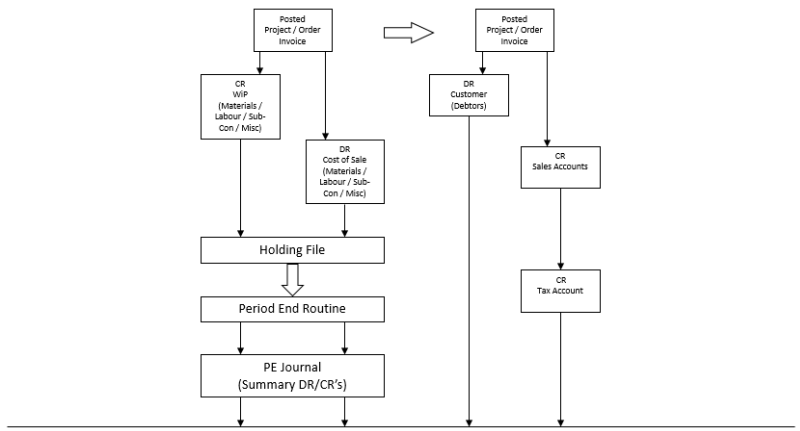
Transaction File (Link to Accounts Package)
Stock Movements
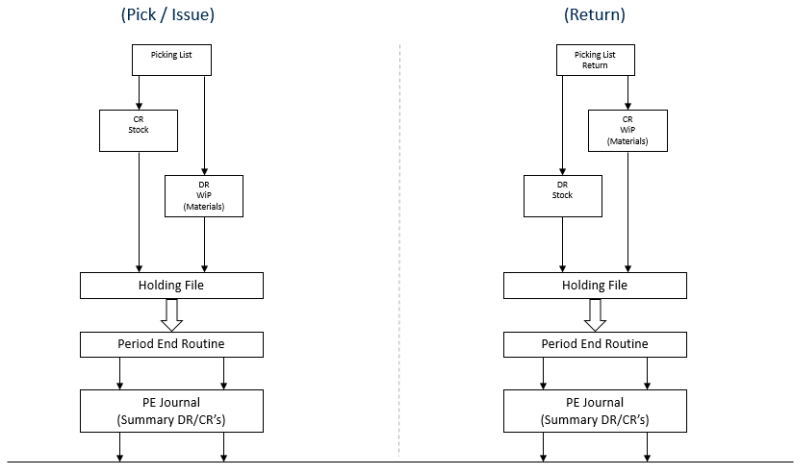
Transaction File (Link to Accounts Package)
Drop Ship

Transaction File (Link to Accounts Package)
* Selection against relevant Sales Order Required
RMA Parts Returned

Transaction File (Link to Accounts Package)
END