



Print this Topic
Overview
The Aerotrac Component Log enables you to keep track of major components, and enables you to build a component with all its child part information, including serial numbers and life details, and hold all the component’s Scheduled Maintenance and OEM Publication data as well.
The Component Log acts like a mini Aircraft Status for the component itself, when not fitted to an aircraft. The premise is that the Component Log is built when a component is received into Stock. As the component would normally be accompanied by its Log Books and Release certification on receipt, all the required data should be on hand to complete the Component Log.
Setting all this data up against the component while it’s in stock can help enormously when it is subsequently fitted to an aircraft via Project or Maintenance Updates. All the confirmed known data for the component is then automatically applied to the aircraft when the part is added to the Configuration.
The Log can be used for new items received, or for items removed from an aircraft that require some form of processing before being fitted back to the same aircraft or moved to another aircraft. For example, if an engine is removed and sent for overhaul, when it is received back from the Supplier, some of its component parts may have been changed. This can be recorded on the engine whilst it is sitting in stock via the Component Log.
If applicable, the Component Log can be used if your organisation has its own Component or Engine facility. For example, if an engine comes back from your Engine Shop, the Component Log can be used to update the engine data before it goes back to its Parent Project.
From the Aerotrac main menu, navigate to Materials and click on the "Component Log" menu link :-
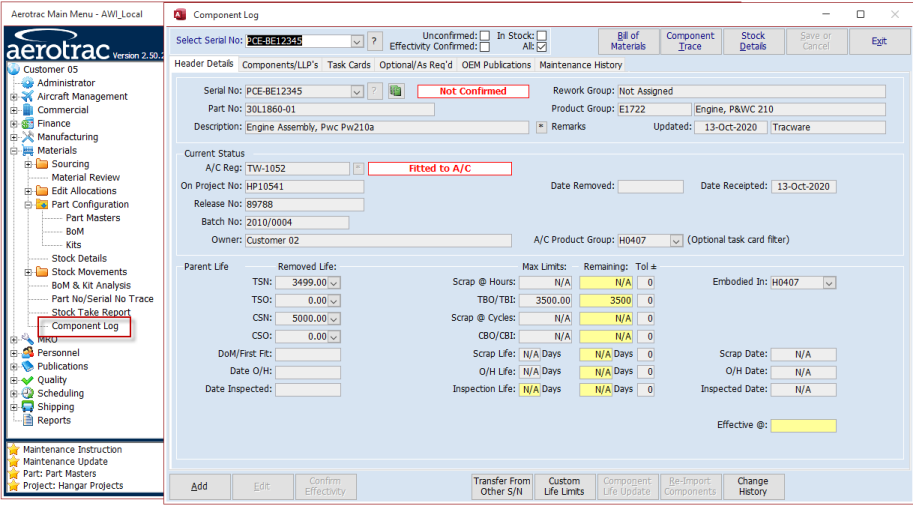
In the screen that opens you will see various tabs. These tabs are discussed in subsequent sections of this topic.
Aerotrac Version - 2.50.25.01, January 2022
Not controlled once printed
END