



Print this Topic
Overview
This topic provides the basic fix required when users get the following pop-up message or receive the error "The OpenForm action was cancelled" :-
 the
the
A similar message can also apply to the MSCOMCT2.ocx and Comdlg32.ocx files.
These are Windows control files that are used by the Aerotrac software and can become corrupt due to Windows or Microsoft Office updates etc.
Fixing Via the CMD Prompt
You need to open the cmd prompt as Administrator, on the user PC :-

Within the cmd prompt, navigate to C:\Windows\sysWOW64 and hit the "Enter" key on your keyboard :-
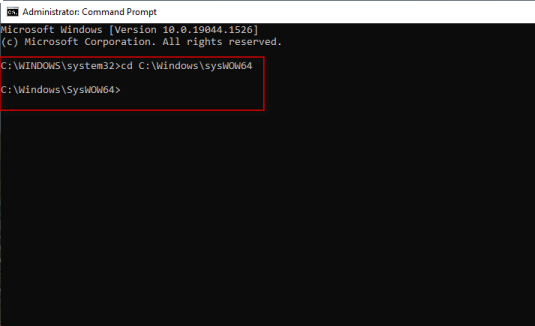
Type the following at the prompt :-
Regsvr32.exe MSCOMCTL.ocx :-

Hit the "Enter" key on your keyboard and if the registration of the file is successful then you will see the pop-up as above.
Repeat the above step for the "Regsvr32.exe MSCOMCT2.ocx" and "Regsvr32.exe Comdlg32.ocx" files.
If you receive any errors then you will need to raise a Support Log via your PPC login to the Tracware Support Website. Refer to topic Logging Software Support Enquiries.
Aerotrac Version - N/A, March 2022
Not controlled once printed
END