



Print this Topic
Overview
The Tracware Support Team has a remote support application that allows connection to your PC or server in order to provide you with Aerotrac support.
The application is a client version of the Teamviewer software.
Downloading and Running the Application
You will need to download the application to your machine and this can be achieved using this link https://login.tracware.co.uk/AerotracRemoteSupport.exe.
By default the file will be saved in your "Downloads" folder but you can cut and paste this to your preferred location on your PC.
When launching the application you will be presented with an ID and password :-
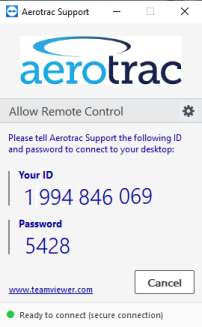
All you need do is keep the application running and report the ID and password to the Tracware support team support@tracware.com.
Once the Tracware Support Team member has these details they will be able to connect and assist accordingly.
Aerotrac Version - N/A, September 2021
Not controlled once printed
END