



Print this Topic
Engine Utilization
As each utilization entry is added, it is necessary to go to each of the upper tabs to enter the relevant data for each of the Tech Log items.
If an Engine (or Propeller, APU) tab is missing from the Utilization screen this is because the item has not been flagged as a "Tech Log" item on the Aircraft Configuration screen :-

This can be rectified by going to the Config Status screen for the relevant aircraft, editing and ticking the "Tech Log" tick box. You will also need to set the relevant "Entry Type".
Flight Details
You will need to enter the flight details for the first Engine, on the first lower tab. Enter the Engine hours and starts as necessary :-
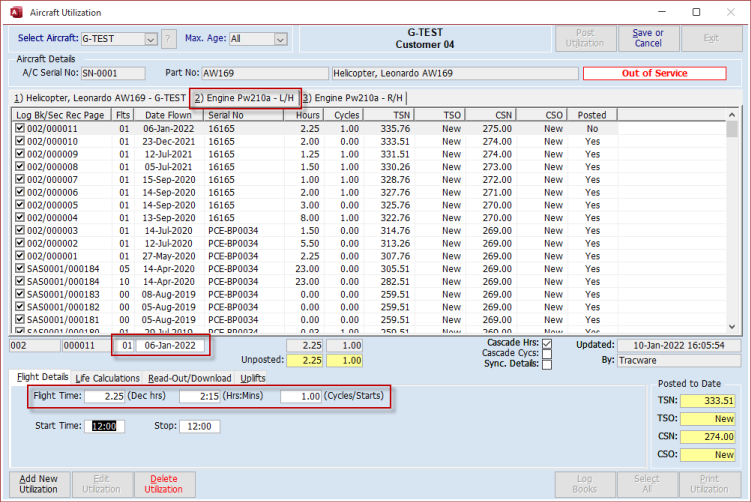
Note: The fields available will be subject to the setup of the Aircraft / Engines and Engine Components. Refer to the topic Utilization - Overview and Setup for further details.
Some Engine types need to be set up to record N1 (Gas Producer) and N2 (Power Turbine) cycles, for example, and with the correct setup, the relevant fields will appear in order that this data can be entered :-

Life Calculations
This tab is the same as that displayed on the initial Aircraft tab and if ticked on the Aircraft tab will show as ticked on the Engine tab also. If a line is unticked on the Engine tab, then it will also show as unticked on the Aircraft tab.
Readout/Download
This functionality allows for the entry of engine component cycle data directly against each component. The data would come from a download from the aircraft Integrated Instrument Display System or similar device.
You can type into the CSN and CSO fields the new total values or you can type in the number of cycles to increment in the "+/-" fields and the new totals will automatically be calculated :-
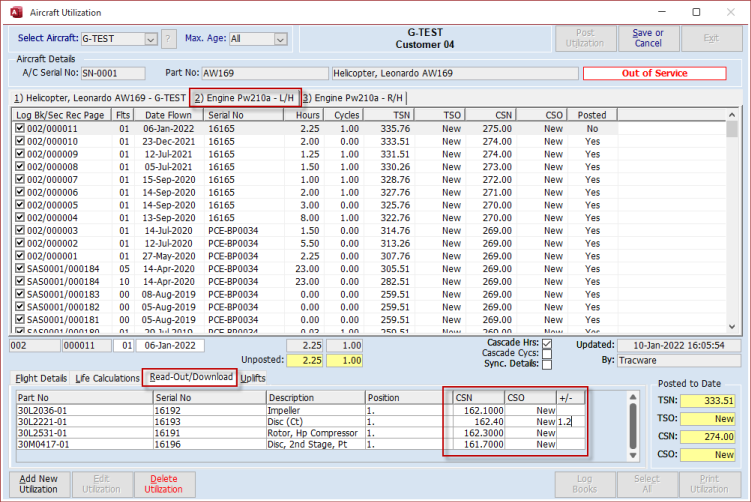
Note: The fields available will be subject to the setup of the Aircraft / Engines and Engine Components. Refer to the topic Utilization - Overview and Setup for further details.
For the purpose of covering this tab within this topic, the Readout/Download data has been entered on a normal utilization entry along with other data entered on the other tabs. In reality it may be the case that a "No Flight Sector" utilization entry is added purely for entering the Readout/Download data as part of a regular scheduled event.
Uplifts
This lower tab allows for the entry of any uplifts that are relevant to the flight that has taken place. In the case of Engines, this is limited to oil uplifts :-
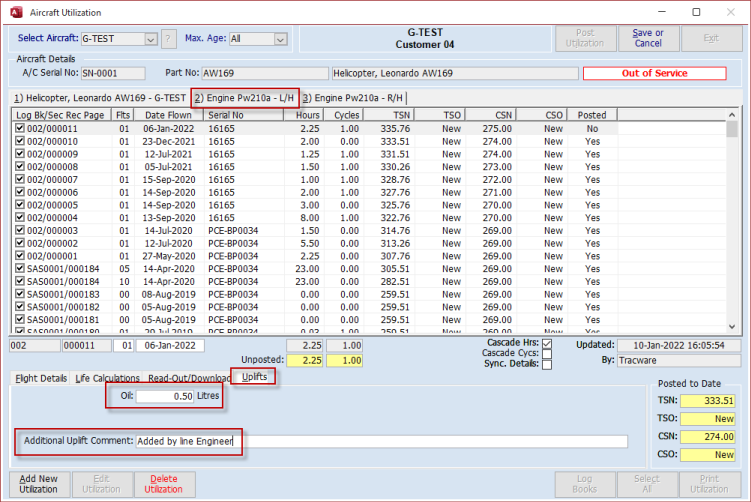
The Uplifts can be reported on via the utilization reports. Refer to topic Utilization Reports.
Repeat the above process, on the subsequent tabs, for the entry of the relevant data on any other Engines, APUs and Propellers etc.
Aerotrac Version - 2.50.25.01, January 2022
Not controlled once printed
END